
Sunday, April 05, 2026
The Glass Fortress: Why We Cling to Superiority in a Fractured World
Check out this article on Layerd:
Read more: https://layer-app-2024.web.app/article/960ae7eb-d5f7-448f-bdf1-458a3ae66d14
 ## The Mirror of the Mind
Have you ever wondered why the human brain, so capable of empathy and high-level reasoning, seems perpetually drawn toward division? We observe the modern political landscape, riddled with territorial disputes and volatile rhetoric, and we see something deeply unsettling: the persistent, gnawing need to feel superior. It is a psychological survival mechanism gone wrong. At its core, the drive to label others as 'inferior' is not about the other person at all; it is a defensive fortification built to protect a fragile sense of self. What if our obsession with being 'better' is actually a symptom of our collective insecurity?
## The Architecture of Tribalism
Psychologically, the impulse toward superiority stems from the need for distinct group identity. In times of uncertainty—whether induced by shifting geopolitical borders or economic instability—the human psyche seeks safety in homogeneity. By defining 'us' against 'them,' we create a simplified reality where our values are inherently righteous and others are inherently flawed. This is not merely an individual quirk; it manifests on a national scale. When a nation asserts its dominance, it is often a projection of a need for validation that the international order refuses to grant. We see this in the cycle of conflict where nation-states trade insults like schoolyard bullies, each terrified that to acknowledge the legitimacy of the other is to somehow diminish their own standing.
## The Paradox of Doctrine and Deception
Perhaps the most baffling element of this puzzle is the role of belief. Most of the world’s major religions are built upon foundations of humility, charity, and the inherent sanctity of life. Yet, throughout history and into the present day, we witness these same doctrines twisted into weapons. Why does the 'thou shalt not kill' or the call to 'love thy neighbor' so frequently lose out to the intoxicating lure of religious superiority? It suggests that we are remarkably adept at compartmentalization. We use dogma not as a mirror to examine our own biases, but as a sword to defend our perceived elevated status. This intolerance is rarely about the faith itself; it is about the power that comes from being the 'chosen' group. It provides a convenient psychological cover for the baser instincts of exclusion.
## The Cost of the Ego
This need to be superior creates a high-stakes environment where compromise is viewed as failure. When we view the world through a binary lens—winner versus loser, saint versus sinner—we lose the capacity for nuanced diplomacy. In our current climate, where mob mentality can mobilize across social platforms in seconds, this superiority complex is amplified. We find comfort in the echo chamber of our own perceived righteousness, turning away from any perspective that challenges our status. But what if we shifted the focus? What if, instead of asking 'Who is right?', we asked, 'What is the cost of our need to be superior?'
## Beyond the Fortress
Breaking free from this cycle requires a radical form of introspection. We must recognize that the urge to belittle others is a neon sign pointing directly to our own inner doubts. If we were truly secure in our identity—as individuals or as nations—would we feel the constant need to prove our superiority? Probably not. True strength often manifests in the quiet confidence that allows for disagreement without dehumanization.
As we look at the headlines, perhaps the most revolutionary act we can take is to lean into the discomfort of ambiguity. To admit that someone else’s existence does not subtract from our own. We are caught in a cycle of needing to be the protagonist of a story that demands a villain. But if we can learn to dismantle the need for superiority, we might find that the world is not a battlefield, but a complex, interconnected web that only functions when we acknowledge that we are all equally vulnerable. Are we brave enough to let the fortress fall?
## The Mirror of the Mind
Have you ever wondered why the human brain, so capable of empathy and high-level reasoning, seems perpetually drawn toward division? We observe the modern political landscape, riddled with territorial disputes and volatile rhetoric, and we see something deeply unsettling: the persistent, gnawing need to feel superior. It is a psychological survival mechanism gone wrong. At its core, the drive to label others as 'inferior' is not about the other person at all; it is a defensive fortification built to protect a fragile sense of self. What if our obsession with being 'better' is actually a symptom of our collective insecurity?
## The Architecture of Tribalism
Psychologically, the impulse toward superiority stems from the need for distinct group identity. In times of uncertainty—whether induced by shifting geopolitical borders or economic instability—the human psyche seeks safety in homogeneity. By defining 'us' against 'them,' we create a simplified reality where our values are inherently righteous and others are inherently flawed. This is not merely an individual quirk; it manifests on a national scale. When a nation asserts its dominance, it is often a projection of a need for validation that the international order refuses to grant. We see this in the cycle of conflict where nation-states trade insults like schoolyard bullies, each terrified that to acknowledge the legitimacy of the other is to somehow diminish their own standing.
## The Paradox of Doctrine and Deception
Perhaps the most baffling element of this puzzle is the role of belief. Most of the world’s major religions are built upon foundations of humility, charity, and the inherent sanctity of life. Yet, throughout history and into the present day, we witness these same doctrines twisted into weapons. Why does the 'thou shalt not kill' or the call to 'love thy neighbor' so frequently lose out to the intoxicating lure of religious superiority? It suggests that we are remarkably adept at compartmentalization. We use dogma not as a mirror to examine our own biases, but as a sword to defend our perceived elevated status. This intolerance is rarely about the faith itself; it is about the power that comes from being the 'chosen' group. It provides a convenient psychological cover for the baser instincts of exclusion.
## The Cost of the Ego
This need to be superior creates a high-stakes environment where compromise is viewed as failure. When we view the world through a binary lens—winner versus loser, saint versus sinner—we lose the capacity for nuanced diplomacy. In our current climate, where mob mentality can mobilize across social platforms in seconds, this superiority complex is amplified. We find comfort in the echo chamber of our own perceived righteousness, turning away from any perspective that challenges our status. But what if we shifted the focus? What if, instead of asking 'Who is right?', we asked, 'What is the cost of our need to be superior?'
## Beyond the Fortress
Breaking free from this cycle requires a radical form of introspection. We must recognize that the urge to belittle others is a neon sign pointing directly to our own inner doubts. If we were truly secure in our identity—as individuals or as nations—would we feel the constant need to prove our superiority? Probably not. True strength often manifests in the quiet confidence that allows for disagreement without dehumanization.
As we look at the headlines, perhaps the most revolutionary act we can take is to lean into the discomfort of ambiguity. To admit that someone else’s existence does not subtract from our own. We are caught in a cycle of needing to be the protagonist of a story that demands a villain. But if we can learn to dismantle the need for superiority, we might find that the world is not a battlefield, but a complex, interconnected web that only functions when we acknowledge that we are all equally vulnerable. Are we brave enough to let the fortress fall?


Sunday, November 14, 2010
Testing BlogBooster
Ok, so I was disappointed by meblog's typing interface. I mean, come on, that's the most important part of a blogging application! I am trying another app called BlogBooster, that has been around the block a little longer. The interface appears satisfactory. Unfortunately, the formatting buttons seem not to work at ALL. Come on people. It can't be that hard.
Picture test:

Picture test:
Testing "meblog"
Wow. I was recently reminded of this blog. I figured I'll try it out again for a bit, using my iPhone this time. Currently I am typing using the landscape mode of my phone, in an app called meblog. I think they just reversed the name of another app: (with a better flowing name) blogme. Perhaps they should call this MyBlog instead. It's simple and effective, however needs more polish. A WYSIWYG Interface would be better. Also, the simple HTML tag commands suck because they don't work with highlighted text. They just add beginning and ending notations for the code one after another. Which is pretty useless.

Well let's see how this works out anyway.
Saturday, December 26, 2009
Make your own iphone theme
Here's a site called iphonethemegenerator that allows you to make your iphone look like the way YOU want it to. Need a jailbroken iphone, like usual.


Changing iphone SMS tones
Found this great article on how to change your iphone's SMS sounds to whatever you want.
How to Create and Install multiple SMS Tones on Your iPhone
by RoryPiper on June 28th, 2009
Hey, RoryPiper here. One of the gripes most people have about thier iPhones, is the limited number of tones that come with the OS. Especially, the SMS tones, as there are only 6. Well, with this tutorial, I will show you how to create, and install, multiple SMS tones, on your iPhone. This is gonna take a bit of skill, on your part, but I’m going to walk you through it, as best as I can.
You will need a jailbroken iPhone, with OpenSSH and Winterboard installed. On your computer, you will need an FTP program and some simple audio editting software, something that can export to AIFF. In this tutorial, I’ll be using a Mac with Filezilla, and Audacity. There are Windows versions of both of these, if you prefer the lesser of the operating systems . Both Filezilla and Audacity are free to download.
There are 3 steps involved: 1. Creating the Tone. 2. Packaging the tone for Winterboard and, 3. Installing the tone on your iPhone.
1. Create Your Tone
First, you need to pick a sound you want for your tone. It can be a WAV or MP3, or any sound file your software can handle. Just do a Google search for “free wav”, and you’ll find something. I have chosen “Hooah!”, from Scent of a Woman. Using Audacity, simply drag and drop the file into the program. You can edit it, if it’s too long. You should keep it short. This one is just right, so we’ll export it.
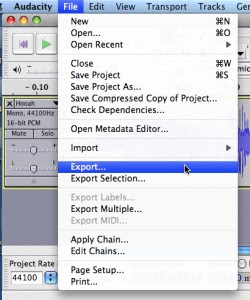
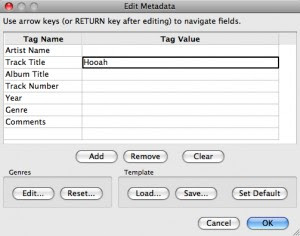
Go to File, then Export. In the pop-up, name the track. Then in the drop-down, leave the name the same, and choose desktop, as your location. It is important to get the file type correct. In the scroll down menu, choose AIFF. Then, click save. The new file will show up on the desktop as “Hooah.aiff”.
2. Package Your Tone for Winterboard
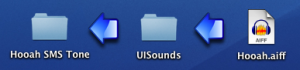
Now that we have the sound created, we need to package it for Winterboard. On your desktop, create a new folder, and name it appropriately. Mine is called “Hooah SMS Tone”. Then within that folder, create another folder and name it “UISounds”. This one is case sensitive, so make sure you spell it: capital u, capital i, and capital s on sounds. All together, with no spaces. Then, drag and drop your tone into the “UISounds” folder.
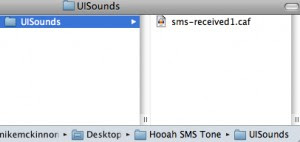
Next, we have to change the name and extension of the file, so the iPhone can recognize it as a SMS tone. All SMS tones on the iPhone are named sms-received, 1 through 6, with the extension .caf. We will be replacing the Tri-tone, so we will use number 1. Name the file “sms-received1.caf”. (In Windows you may need to change your folder settings: make sure “Hide Extensions” is unchecked, to be able to edit your extensions).
If you’re having trouble, you can download my example here.
3. Install on Your iPhone and Apply as SMS Tone
With the tone packaged for Winterboard, we now need to put it on your iPhone. This is where your FTP program and OpenSSH come into play. What was that? Did you just say: “FTP? SSH? WTF?!”. Well, this might be a little tricky for some of you, so if you’re new to OpenSSH, you can search YouTube for a full tutorial.
This has to be done over a WiFi network that both your iPhone and your computer are connected to. Open Filezilla, and log in to your iPhone. For the host, type in the IP address of your iPhone (huh?: Go into Settings, tap WiFi, then tap the arrow to right of your selected network). The username is “root”, the password is “alpine”, and you want to use port 22. It may take a few tries to get in, if you’ve never used OpenSSH before, so have patience.

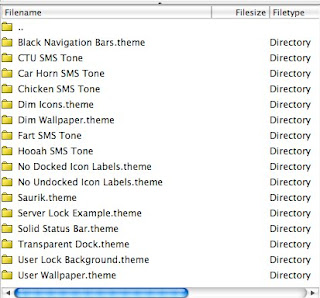
In your local folders(your computer), navigate to your desktop, so that you can see the “Hooah SMS Tone” folder we created earlier. In your remote folders (your iPhone), you need to navigate to Library > Themes. Then drag and drop your folder from your local to your remote. Be careful not to mess around with anything else on your iPhone, unless you know what your doing. You don’t want to change something crucial, by accident, and then have to restore your phone. The right folder should look something like this:
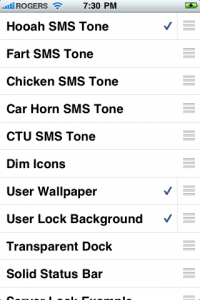
The only thing left to do is make the new SMS tone active. Open Winterboard, on your iPhone. You should see your new tone in the list. Select it, and exit Winterboard. Your iPhone will respring.
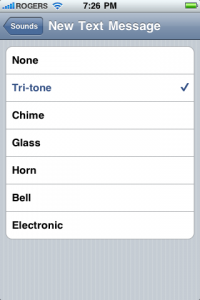
Once your lock screen comes back up, go into Settings > Sounds > New Text Message, and select “Tri-tone”. You should hear your new tone!
The great thing about this method is, you can create and install as many tones as you like, while never losing your original Tri-tone sound. If you want to use a different tone, just go back into Winterboard, select a new tone, unselect the old tone, and exit Winterboard. If you want your Tri-tone back, just unselect all SMS tones in Winterboard.
Well, there you go. You are now an iPhone hacker! Kinda. I hope this wasn’t too overwhelming. I have tested this method on the 1st gen iPhone and the iPhone 3G, on fw2.x.x and fw3.0. Hope it works for you!
Twitter: @RoryPiper
How to Create and Install multiple SMS Tones on Your iPhone
by RoryPiper on June 28th, 2009
Hey, RoryPiper here. One of the gripes most people have about thier iPhones, is the limited number of tones that come with the OS. Especially, the SMS tones, as there are only 6. Well, with this tutorial, I will show you how to create, and install, multiple SMS tones, on your iPhone. This is gonna take a bit of skill, on your part, but I’m going to walk you through it, as best as I can.
You will need a jailbroken iPhone, with OpenSSH and Winterboard installed. On your computer, you will need an FTP program and some simple audio editting software, something that can export to AIFF. In this tutorial, I’ll be using a Mac with Filezilla, and Audacity. There are Windows versions of both of these, if you prefer the lesser of the operating systems . Both Filezilla and Audacity are free to download.
There are 3 steps involved: 1. Creating the Tone. 2. Packaging the tone for Winterboard and, 3. Installing the tone on your iPhone.
1. Create Your Tone
First, you need to pick a sound you want for your tone. It can be a WAV or MP3, or any sound file your software can handle. Just do a Google search for “free wav”, and you’ll find something. I have chosen “Hooah!”, from Scent of a Woman. Using Audacity, simply drag and drop the file into the program. You can edit it, if it’s too long. You should keep it short. This one is just right, so we’ll export it.

Go to File, then Export. In the pop-up, name the track. Then in the drop-down, leave the name the same, and choose desktop, as your location. It is important to get the file type correct. In the scroll down menu, choose AIFF. Then, click save. The new file will show up on the desktop as “Hooah.aiff”.

2. Package Your Tone for Winterboard
Now that we have the sound created, we need to package it for Winterboard. On your desktop, create a new folder, and name it appropriately. Mine is called “Hooah SMS Tone”. Then within that folder, create another folder and name it “UISounds”. This one is case sensitive, so make sure you spell it: capital u, capital i, and capital s on sounds. All together, with no spaces. Then, drag and drop your tone into the “UISounds” folder.

Next, we have to change the name and extension of the file, so the iPhone can recognize it as a SMS tone. All SMS tones on the iPhone are named sms-received, 1 through 6, with the extension .caf. We will be replacing the Tri-tone, so we will use number 1. Name the file “sms-received1.caf”. (In Windows you may need to change your folder settings: make sure “Hide Extensions” is unchecked, to be able to edit your extensions).

If you’re having trouble, you can download my example here.
3. Install on Your iPhone and Apply as SMS Tone
With the tone packaged for Winterboard, we now need to put it on your iPhone. This is where your FTP program and OpenSSH come into play. What was that? Did you just say: “FTP? SSH? WTF?!”. Well, this might be a little tricky for some of you, so if you’re new to OpenSSH, you can search YouTube for a full tutorial.
This has to be done over a WiFi network that both your iPhone and your computer are connected to. Open Filezilla, and log in to your iPhone. For the host, type in the IP address of your iPhone (huh?: Go into Settings, tap WiFi, then tap the arrow to right of your selected network). The username is “root”, the password is “alpine”, and you want to use port 22. It may take a few tries to get in, if you’ve never used OpenSSH before, so have patience.

In your local folders(your computer), navigate to your desktop, so that you can see the “Hooah SMS Tone” folder we created earlier. In your remote folders (your iPhone), you need to navigate to Library > Themes. Then drag and drop your folder from your local to your remote. Be careful not to mess around with anything else on your iPhone, unless you know what your doing. You don’t want to change something crucial, by accident, and then have to restore your phone. The right folder should look something like this:

The only thing left to do is make the new SMS tone active. Open Winterboard, on your iPhone. You should see your new tone in the list. Select it, and exit Winterboard. Your iPhone will respring.

Once your lock screen comes back up, go into Settings > Sounds > New Text Message, and select “Tri-tone”. You should hear your new tone!

The great thing about this method is, you can create and install as many tones as you like, while never losing your original Tri-tone sound. If you want to use a different tone, just go back into Winterboard, select a new tone, unselect the old tone, and exit Winterboard. If you want your Tri-tone back, just unselect all SMS tones in Winterboard.
Well, there you go. You are now an iPhone hacker! Kinda. I hope this wasn’t too overwhelming. I have tested this method on the 1st gen iPhone and the iPhone 3G, on fw2.x.x and fw3.0. Hope it works for you!
Twitter: @RoryPiper
Monday, May 25, 2009
Monday, July 30, 2007
A clip from the Daily Show
I saw this on TV a while ago, and I meant to put this up....
Aasif Mandvi weighs the situation and does a desi shoutout anyway on a Daily Show segment about the new immigration bill.
Stewart: You yourself were not born here, you were…
Mandvi: Brown? … But I’m from India. I’m tech support / cardiologist brown…
Audience: [Cheers…]
Mandvi: Shout out. Not dishwasher / parking attendant brown. And I say that with no disrespect…
Stewart: What is the [immigration bill’s] point system trying to accomplish? …
Mandvi: Assigning a point value will keep us from becoming a safety country. This is America, Jon, not Wesleyan… American has rebranded its immigration policy.
Stewart: And the new slogan is?
Mandvi: ‘What can brown do for you?’
Aasif Mandvi weighs the situation and does a desi shoutout anyway on a Daily Show segment about the new immigration bill.
Stewart: You yourself were not born here, you were…
Mandvi: Brown? … But I’m from India. I’m tech support / cardiologist brown…
Audience: [Cheers…]
Mandvi: Shout out. Not dishwasher / parking attendant brown. And I say that with no disrespect…
Stewart: What is the [immigration bill’s] point system trying to accomplish? …
Mandvi: Assigning a point value will keep us from becoming a safety country. This is America, Jon, not Wesleyan… American has rebranded its immigration policy.
Stewart: And the new slogan is?
Mandvi: ‘What can brown do for you?’
Tuesday, May 01, 2007
Monday, April 23, 2007

Tuesday, March 27, 2007
God of War II

Well the sequel to the best game I have ever played (or maybe second best after Resident Evil 4, its SO hard to decide) was finally released this month. Good thing I have a free game rental every month with Blockbuster online! I have only started to play this game, and I don't see many differences yet from the previous game in terms of gameplay and moves, but who cares! GoW was so much fun that I am happy to just play some more.

And I know there's more stuff coming... I have yet to unlock any of the new weapons and I am anxious to see how they'll act out in combat. Plus its just so much fun using the default weapons... and you start off with full expert proficiency with these basic weapons (athena's blades) that were the final/best weapons in GoW. Anyway, more later on how the game panned out.

So far, as quoted by Rolling Stones in Supersize Me, "I'm loving it..."

Subscribe to:
Posts (Atom)